How to Make Minecraft Pixel Art: Complete Beginner Guide
Learn to create stunning pixel art in Minecraft from scratch. Covers manual methods, online tools, block color charts, and practical tips.
So you want to make pixel art in Minecraft? It's basically using blocks as pixels to create images. Each block has its own color, and when you arrange them right, you can make anything from tiny game icons to massive murals that span hundreds of blocks.
Pixel Art vs Map Art - What's the Difference?
People mix these up all the time:
- Pixel art is built directly on the ground or walls with blocks. Stand back far enough and you see the picture.
- Map art requires you to craft an actual map item to see the image.
Both are cool, both use similar techniques - converting images to blocks.
Making Pixel Art by Hand
Pick the Right Image
Not every picture works well. Here's what to look for:
- Keep it simple when starting out. Game character faces, logos, that sort of thing.
- High contrast matters. Clear color differences convert way better.
- Skip the gradients. MC blocks only come in so many colors, so smooth gradients just turn into a mess.
Figure Out Your Size
This directly affects how long you'll be at it:
| Size | Block Count | Good For | Pain Level |
|---|---|---|---|
| 16×16 | 256 | Icons, emotes | Manageable |
| 32×32 | 1,024 | Character sprites | Getting tedious |
| 64×64 | 4,096 | Detailed portraits | Pretty rough |
| 128×128 | 16,384 | Full map art | Don't even try manually |
Gather Your Materials
Make sure you've got enough before you start:
- Wool - 16 colors, just need some sheep
- Concrete - Also 16 colors but brighter and more saturated
- Terracotta - Muted tones, good for vintage looks
- Stained glass - For special effects
Actually Building It
Row by row is the safest approach:
- Start from top-left
- Place blocks one at a time, checking your reference
- Finish a row, double-check it, move on
- Step back occasionally to see how the whole thing looks
Using Tools to Speed Things Up
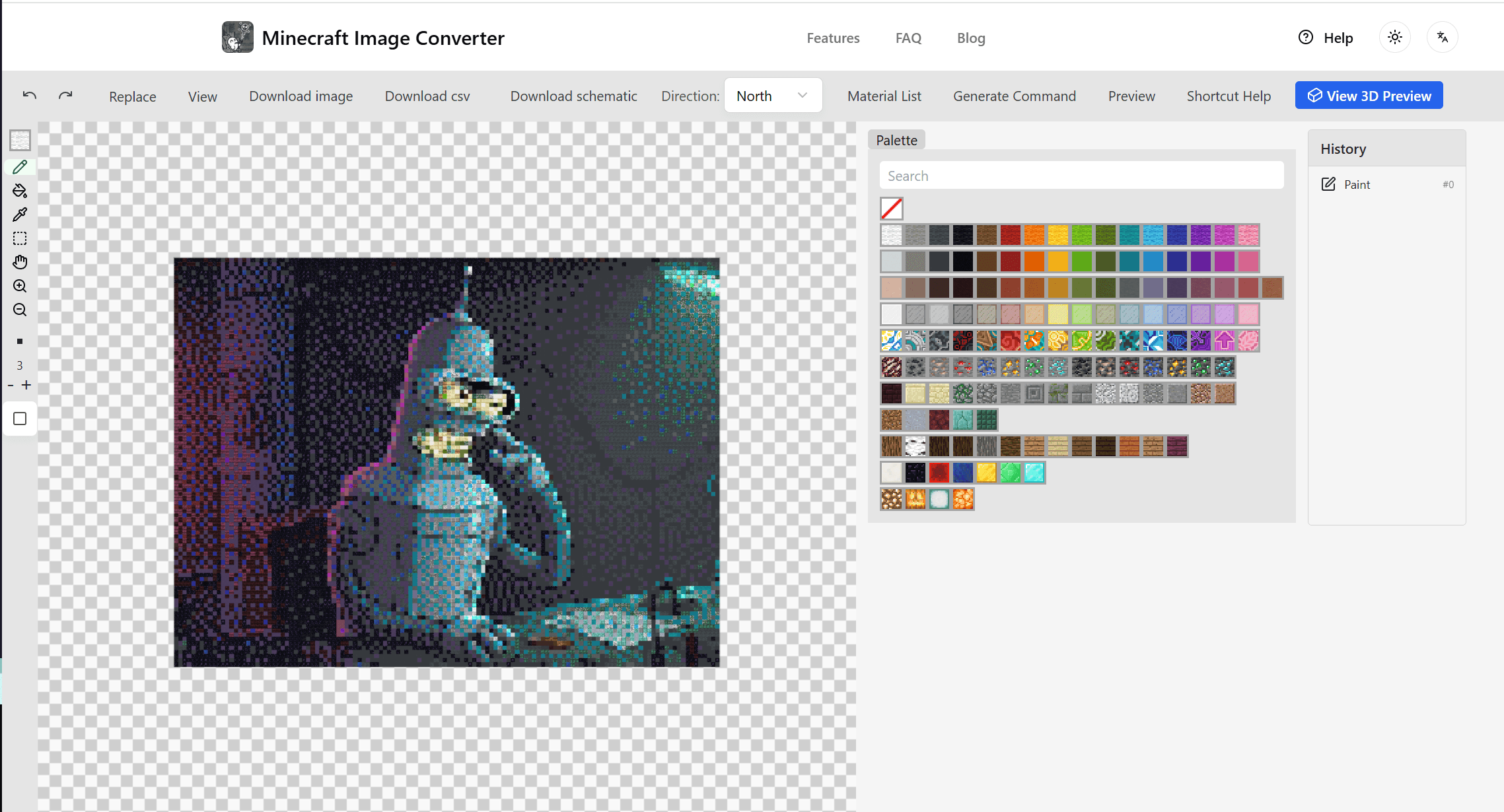
Let's be real - manually figuring out which block matches which pixel is brutal. That's where online pixel art generators come in.
My Usual Process
- Upload the image to Minecraft Image Converter
- Tweak the settings - size, dithering, whatever
- Check the 3D preview and rotate it around
- Export however works best:
- Download a blueprint to follow
- Generate commands to build it automatically
- Export a
.schematicfor WorldEdit
What's Dithering About?
It mixes different colored blocks to fake gradients. When you turn it on:
- Color transitions look smoother
- You get the illusion of more colors
- But up close it looks kinda noisy
Use it or don't depending on what you're going for.
Quick Color Reference
Some common blocks and their map colors (hex codes):
Whites: Snow Block #FFFFFF, White Wool #F9F9F9
Blacks: Black Concrete #252529, Obsidian #1D1D21
Reds: Red Concrete #A12722, Nether Brick #472A27
Greens: Emerald Block #0EC03A, Mossy Cobblestone #667633
Blues: Diamond Block #62D2E7, Lapis Block #1B439B
Full list is in our editor if you need it.
Stepping It Up
Adding Depth with Shadows
Like the staircasing tutorial explains, Minecraft maps show different brightness based on block height:
- Block higher than the one north of it = brighter
- Block lower than the one north of it = darker
Master this and your map art gets real shadows.
Going Bigger Than One Map
For huge pieces, stitch multiple 128×128 maps together. Our tool can auto-split large images for this.
Creative vs Survival
- Creative mode: Use command generation, thousands of blocks placed in seconds
- Survival mode: Place everything yourself, takes way longer but feels amazing when done
Quick Recap
Making MC pixel art boils down to:
- Find a good image
- Decide on size
- Use a tool to convert it
- Build it with commands or by hand
Whether you want to impress people on a server or just decorate your base, pixel art is worth trying.
Give it a shot → Free Online Converter
Author

Categories
More Posts

5 Cool Minecraft House Ideas That Are Not Dirt Huts (2025)
Sick of living in a wooden box? Here are 5 aesthetic house ideas (Cyberpunk, Cottagecore, Modern) that you can actually build without quitting halfway through.

Ultimate Guide to Minecraft Map Art: Generators, Schematics & Tools
Master Minecraft Map Art in 2025. Learn how to use generators to convert images to maps, import schematics with Litematica, and build survival-friendly art.

10 Minecraft Mural Ideas to Fix Your Boring Walls (2025)
Running out of decoration ideas? Here are 10 pixel art and map art mural ideas you can build in your survival world right now.